
 Harmonia EQ · Dynamic & spectral EQ · by Arswerk
Your tracks are fighting. Harmonia makes room.
Put it on every track: each one hears the others and steps back exactly where they collide. No sidechains to wire up.
You already have your free trial: the code and the downloads are in your account.
Pop · rough mix · The whole mix: nothing on it, then Harmonia on every track
Best on headphones · same mix, same loudness · switch while it plays On the second pass it switches to Harmonia EQ by itself.
- Lifetime licence
- 7-day free trial
- Up to 3 computers
- Secure checkout
- Code by email
Hear the before and after
Press play, then switch between BEFORE and AFTER while it plays: it is the same passage, at the same loudness.
Electronic · house
PUMP: the sidechain pump, with no routing
A house track: Harmonia on the bass, PUMP at 100 %, keyed to the drums. The bass dips by up to about 7 dB on each drum hit and swells back in between. No sidechain cable, no send.
Electronic · house
YIELD: the kick punches through the sub
The same track: Harmonia on the bass, YIELD at 100 %, making room for the drums. The bass steps back about 6 dB below 120 Hz, where the kick lives; above 250 Hz it changes by less than 1 dB. The drums are not touched.
Band · real stems
YIELD: kick and bass stop fighting
Harmonia on the bass, YIELD at 100 %, making room for the drums. The bass gives way only between 150 and 300 Hz, by about 1.8 dB, while the kick hits. The drums are not touched.
Band · real stems
SURFACE: the buried guitars come forward
SURFACE at 80 % on the guitars, with the whole band playing. They come up about 2.8 dB where they were masked; the whole mix stays at the same loudness.
Every example is rendered through Harmonia itself and loudness-matched (−18 LUFS), so what changes is the sound, not the volume. The first mix was generated for the demo with ElevenLabs Music, and its problems (a boomy kick, a ringing drum room, boxy keys) were added on purpose. The house track was also generated with ElevenLabs Music — asked for a kick and sub bass that clash and no sidechain — then split into stems. The band examples use real, untouched stems: “Roulette” by Lorenzo’s Music (Tom Ray), CC BY 3.0
See it in action
Harmonia is an EQ for mixing, not just a curve editor. It has 36 dynamic parametric bands — bell, shelf, notch, tilt, band-pass, all-pass and 6–48 dB/octave high- and low-pass — each with its own dynamics (duck or lift when the energy rises above its own average, Peak or RMS detection, adjustable knee) and its own Stereo, Mid, Side, Left or Right placement. If you want, the bands run in linear phase.
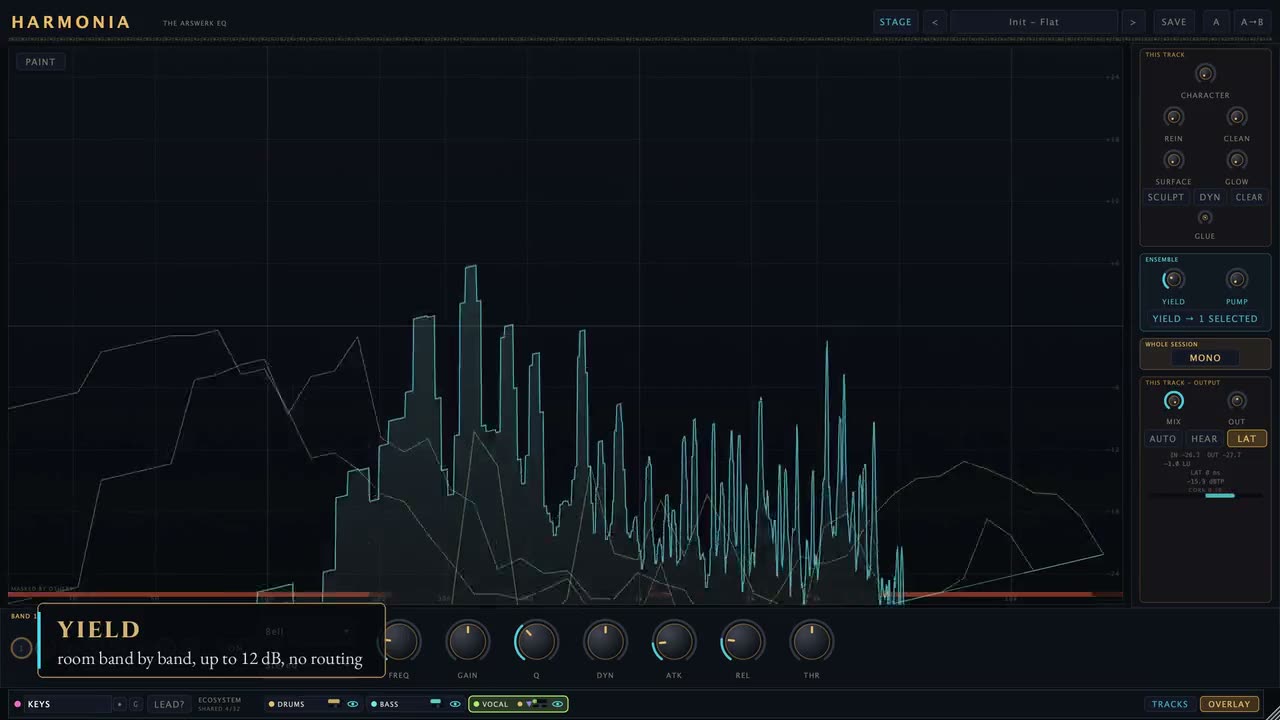
The real difference is the ecosystem. Every Harmonia instance in the session publishes its spectrum to a shared bus (up to 32 instances), and the others see it: YIELD pulls this track down band by band exactly where the others have energy, up to 12 dB; pick which tracks to make room for, or press VS ALL. It is a spectral sidechain with no routing at all. The STAGE shows the whole session as a stage — drag a track to place it in the stereo field; the TRACKS panel controls every instance from one place; PUMP ducks the track on another track’s transients, and MONO FOCUS collapses the entire session to mono with one click.
Harmonia 1.1 adds HEARD, a meter in TRACKS that says for each track whether a listener can still hear it inside the mix — clear, fighting or buried — on studio monitors, a laptop or a phone, and which track is covering it. It only listens and changes nothing. It is a hint, not a verdict: it has been checked against a simple energy rule, not against listeners, so trust your ears.
The spectral engine does the cleaning: REIN finds resonances and pulls them down dynamically, recognising a note’s harmonics so it leaves them alone; CLEAN removes mud between 120 and 700 Hz; SURFACE uses a masking model to lift back what is buried — by other tracks too, because it reads the bus; GLOW adds brightness only where the sound is dull; SCULPT lets you paint a curve by hand straight onto the analyser. Then CHARACTER (PURE to CONSOLE to VELVET, 2× oversampled), the one-knob GLUE compressor, auto-gain, parallel mix, A/B, and low-end alignment across instances (a delay of up to ±5 ms plus an all-pass).
Zero latency until you engage a spectral layer; from then on, one analysis window (43–46 ms), reported to the DAW. Bypass — the DAW’s and the plug-in’s own — is a latency-matched crossfade: it never clicks and never moves the track in time. VST3, AU and CLAP for macOS (Apple Silicon and Intel), Windows and Linux.
How it works
- 1
Press “Start my free 7-day trial”
Type your email. That’s all: no card, no password.
- 2
Download from the email
One email brings the download for macOS, Windows and Linux and your licence code. Its buttons sign you in: we made a free Arswerk account for that email (set a password whenever you like).
- 3
Paste the code into the plug-in
Harmonia opens on its activation panel: paste the code and press Activate. 7 days with everything unlocked, exports included; a strip at the top shows the days left.
- 4
Buy and pick up where you left off
When the 7 days are over Harmonia returns to its activation screen, but your projects keep every setting: the €79 licence — lifetime, on up to 3 of your computers — brings the sound back instantly.
What’s inside
- NEW in 1.1 — HEARD, in TRACKS: every track says how well it can still be heard inside the mix — clear, fighting or buried — on studio monitors, a laptop or a phone (PLAYBACK). It only listens: no sample changes, no latency
- Under a fighting or buried track, HEARD names the track that covers it, and roughly where. It is a hint, checked against a simple energy rule rather than against listeners: trust your ears
- A HELP button with four help cards, and a welcome card the first time you open it
- 36 dynamic parametric bands: bell, shelf, notch, tilt, band-pass, all-pass, HP/LP from 6 to 48 dB/oct
- Per-band dynamics (Peak/RMS, knee, automatic threshold) and Stereo / Mid / Side / Left / Right placement
- Optional linear-phase bands, with the pre-ringing measured and shown
- Shared bus: every instance sees the others’ spectrum (up to 32), with per-track overlays
- YIELD: makes room for other tracks band by band, up to 12 dB, with no routing
- STAGE: the session as a stage — drag to place; TRACKS: control every instance from one panel
- PUMP: ducking on another track’s transients, no sidechain; MONO FOCUS in one click
- REIN: dynamic resonance suppression that spares a note’s harmonics
- CLEAN (120–700 Hz mud), SURFACE (recovers what is masked, by other tracks too), GLOW (brightness only where it is needed)
- SCULPT: paint a 256-point curve straight onto the analyser, dynamic mode included
- CHARACTER from PURE to VELVET, 2× oversampled; one-knob GLUE; auto-gain; parallel mix; A/B
- Low-end alignment across instances: a delay of up to ±5 ms plus an all-pass, searched together
- Click-free, latency-matched bypass; transient hold for the dynamic bands
- VST3, AU and CLAP · macOS (Apple Silicon & Intel), Windows, Linux
Pairs well with
 Nyx Harmonic reverb · Free forever The free reverb that sings in your key. Get it free →
 Frequently asked questions
How do I activate it?
After you buy, you get your code by email and it’s always in your Arswerk account. Paste it into the plug-in’s (or app’s) activation screen and you’re set.
How many devices can I use it on?
Up to 3 of your computers on one licence: paste the same code into each.
Is there a free trial?
Yes — 7 days, complete and unrestricted. Start it from this page with a free Arswerk account (no card); the licence code lands in your account and your inbox. When it ends the plug-in returns to its activation screen and your presets and library are untouched.
Which operating systems are supported?
The plug-in ships as VST3 for macOS, Windows and Linux, plus an AU for macOS — drop it into your plug-in folder and it works in any VST3/AU host. The Fretcraft app runs on macOS (Apple Silicon and Intel), Windows and Linux (.rpm for Fedora, .deb for Ubuntu/Debian).
Can I get a refund?
Digital content is delivered instantly, so you waive the withdrawal right at purchase — but if something isn’t right, write to info@arswerk.it and we’ll sort it out.